
Ephemeral Developer Deployments
To be clear: This is not a brand new thing! Take this article:
Find out how we build serverless applications at Plain and what makes our developer experience truly magical.
 plain.com/blog/a-magical-aws-serverless-developer-experience
</a>
I read this when it was first published in 2022 - and even re-reading today (three years later), it sounds too good to be true. A fully serverless application that every developer can deploy remotely, iterate on, run local unit tests & “remocal” integration tests.
Here is the thing - this is possible today. Platforms like Ampt offer it out of the box. Vercel has preview deployments. And you can build it yourself into your serverless stack, too.
If you’re looking to build it yourself, there are a few ways you could solve this problem for your team(s)/project(s), but to focus on two distinct approaches:
- “Account-level isolation” - Give each developer their own cloud provider account, where they can deploy applications they’re working on (& anything else!) in isolation to everyone else’s (AWS account)
- “Application-level isolation” - One cloud provider account for all developers (e.g. “the Dev account”) but distinctly name applications (specifically: naming the underlying provider resources) when deploying to isolate from everyone else’s (applications)
On the surface, Account-level isolation sounds fairly straightforward:
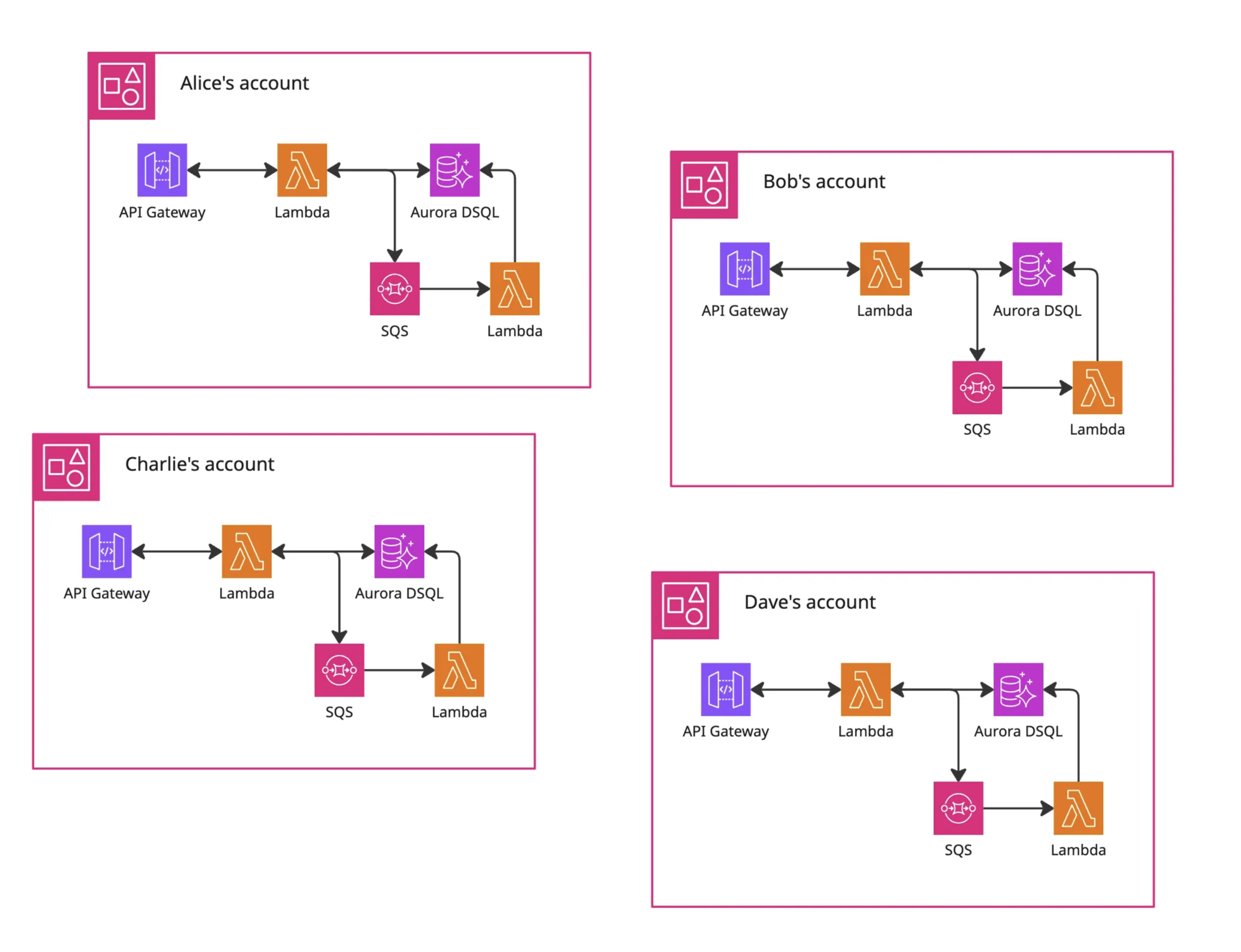
- When onboarding someone new:
- Create a new cloud provider account for them
- Configure it to stop them creating expensive resources by accident
- Attach some billing alerts in case for when that fails
- Then grant them enough permissions for their day-to-day - or AdministratorAccess, if you’re really trusting from day one!
- The developer then deploys & iterates entirely within their own account - probably jumping into the cloud provider console to make click-ops changes at their convenience 🙈
- And they need to deploy & manage anything else the application needs to run (including any shared services or other dependencies), remembering to push updates to those alongside their day-to-day work too.
- I’m not entirely sure how pair-programming would work here, would everyone else on the team get ReadOnlyAccess or similar permissions?
- Oh, and don’t forget to sunset their account when they leave, and pray there was nothing business-critical buried in there 🤞
This may be manageable for a startup with ten or less engineers.. but for enterprise teams this management will quickly become a full-time role on its own!
In my opinion, that’s too much to manage - for both the developer & the devops team. Although I’m sure cloud providers would much prefer everyone has an account per developer (per application 😈), it’s a lot to manage & a lot to configure… and they don’t do much to help you with this - you have to do everything yourself!
Given that, I much prefer the Application-isolation level:
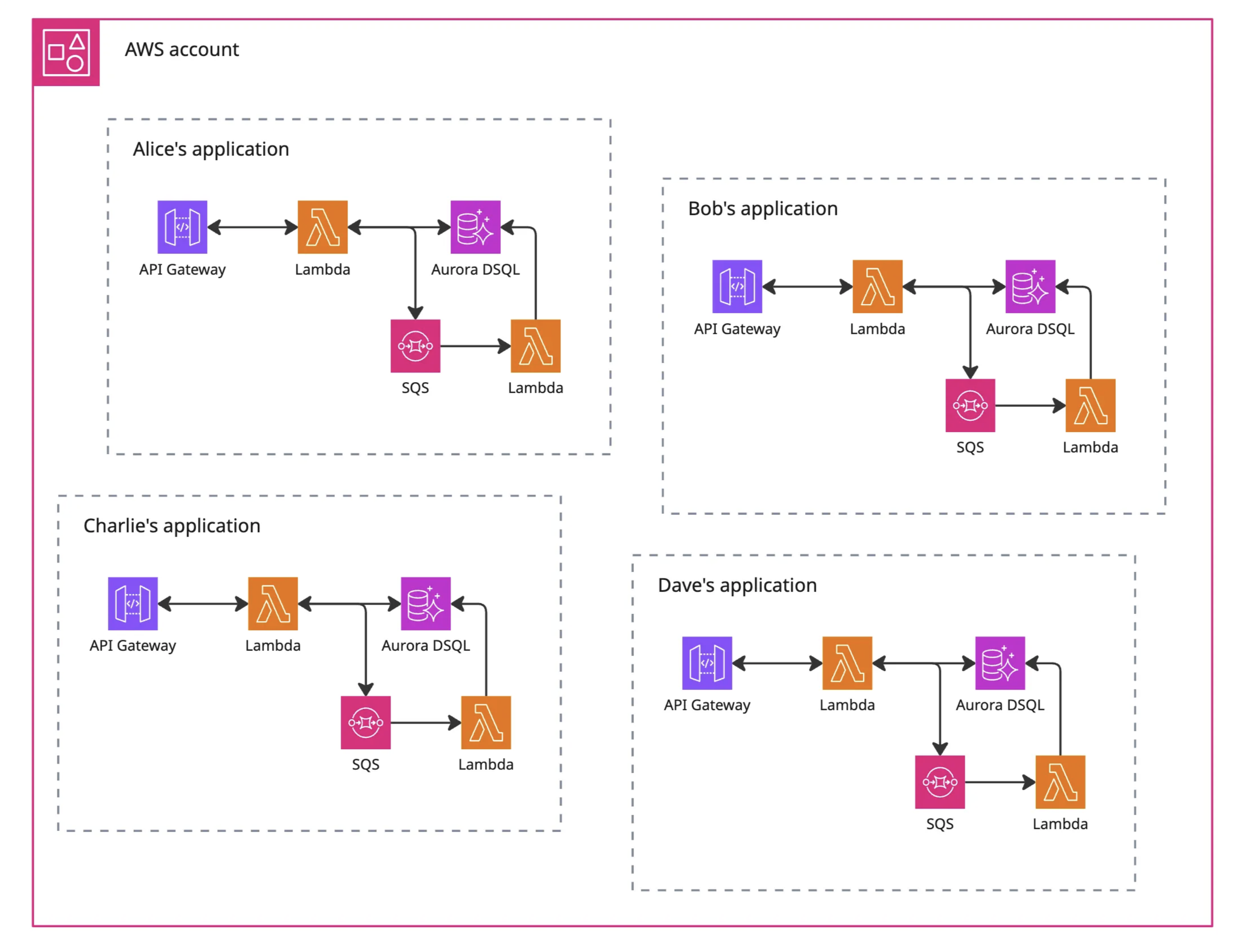
- For each stack / collection of resources (regardless of: CDK, Terraform, Pulumi, Serverless Framework, etc) - build in support for an optional “ephemeral identifier” parameter/variable
- This “ephemeral ID” should be a string of reasonable length (e.g. 7 or 8) to help distinguish resource ownership - but note, if you have fixed naming conventions you’ll want to use a small string to avoid hitting unexpected “Resource name must be less than 20 characters” errors 😩
- Pass it everywhere - as a top-level parameter/variable, and as low-level as you can, so everything that needs a unique name (functions, databases, storage buckets, etc) can have a unique name (e.g. corp-app-jdrydn-api)
- But make it optional - when deploying a stable version of your application (aka, not ephemeral!) (e.g. prod, staging) then ephemeral ID isn’t needed & shouldn’t be be set!
- Deploy ephemeral instances of a single application side-by-side other instances - where this “ephemeral ID” enforces uniqueness & ensures each deployed instance can operate independently
Additional benefits of this:
- If you need to identify who owns what resource, you should be able to work it out from the name of the resource. You could also add specific tags to resources, especially useful for those inconsistent services that don’t use resource names (e.g. AWS Cloudfront)
- You can also filter your provider stacks (e.g. AWS Cloudformation) (or Terraform/Pulumi state files) to manage entire applications/services, instead of digging on specific provider resources - that choice is supposed to be yours but it may be dictated by your IaC provider or other factors.
- When dealing with a shared event bus, if you’re able to filter based on the source then add ephemeral ID to the source. This means your application will only listen to events intended for it - and should ignore all other events intended for stable or other ephemeral deployments!
- And when dealing with shared routing, get the ephemeral ID into the URL. Hostnames work very well, especially with wildcard DNS & SSL, or pathname suffixes can work too (e.g. AWS API-Gateway Custom Domains)
Downsides of this:
- You’ll need to manage a map of people to ephemeral IDs, to ensure no conflicts. This can be as easy as a Google Doc, Notion page, Confluence page, etc.
It gets more interesting when you come to look at sharing services: CICD pipelines could then deploy a “stable” version of the application/service to the “Dev” account too (perhaps before prod?) for individual developer deployments to tap into! Just be sure to share some documentation with those teams! (See: Gitbook or Eventcatalog, but please write something! 🙏)
Use-case: Your day-to-day work involves features & fixes for an application that relies on an authentication service, a file storage service & messaging service, all three are managed by different teams.
- With Account-level isolation, you would deploy your application, and a copy of all three dependencies. You’ll redeploy your application as you iterate on it, but you’ll probably forget to deploy the latest version of all three dependencies when they push updates - and there is every chance the latest version might introduce unexpected bugs in your application!
- With Application-level isolation, you would deploy your application - and that’s it! The three dependencies would already be deployed to the “Dev” account, as stable deployments, ready for your ephemeral deployment to use. And when they push updates, you would be building your application directly against their latest changes.
And of course, there are downsides to ephemeral deployments:
- Experience: You may need to help craft the “developer experience” - especially if your team aren’t used to working this way… but the (small) time investment here will pay off massive as the applications/services scale & as the teams size increases!
- Costs: If everything is truly “serverless” then you have nothing to worry about! But if you have long-lived resources, you’ll probably want to work some “ternary magic” to use smaller sizes
- Cleanup: When team members move on, a little cleanup will always be necessary. Sunsetting an account usually puts it into a month-long pause, whereas removing individual applications from a shared account is instant. Consider who will be doing this too!
One clear advantage for Application-level isolation: The same logic used to isolate developer applications can be used during CICD, for parallel pipeline execution:
- In theory: A developer has finished their feature, they could raise a PR for other team members to review & offer a deployed instance for review too
- In practice: Integration tests can be run against an ephemeral deployment, improving reliability & avoiding “congestion” (common in instances where only one provider account is available!)
- During CICD, the ephemeral ID should be something consistent, like a PR number.
- And these ephemeral instances can also be shared team-wide - e.g. to designers for a “design review”, with a QA team for a round of manual testing, or with stakeholders for a demo!
So far, I’ve managed to implement Application-level isolation in a few projects, including lambda-edge-authorisers & thatblog. And at BPP, most applications/services now have “ephemeral” support, and the feedback has been resoundingly positive!
After all of this - regardless of which route you choose - the intended benefits of ephemeral deployments are hopefully clear to developers:
- “Cloud-native” workflow - building and testing against the cloud
- Cross-application bug squashing - there’s nothing stopping you launching two services with the same ephemeral ID, and configuring them to talk to each other in order to fix that one weird bug that keeps popping up!
- Faster iteration of integration tests too - and that includes frontend tests like Playwright or Selenium!
- Tools like Localstack aren’t required anymore.. why mock the cloud when you can build against it!
And once the developer-dice falls, the knock-on benefits for the wider team & business includes:
- Faster feature development, using the latest cloud features & resources
- Fewer bugs/incidents, especially where cloud resources are concerned (no more “it works on my machine” when software is built against the cloud!)
After reading this, I hope you feel empowered to add ephemeral deployments to your applications & services. It’s given me the ability to truly move at speed, and have real confidence in the work I push out, and I hope it does the same for you too, if not better.
🖖
(A version of this was first published on BPP’s Medium page)